
Use a passkey whenever a service offers one. It is phishing-resistant because there is no code to steal and the cryptographic exchange is bound to the real website. Keep an authenticator app for services that still require password-plus-TOTP and as a carefully configured backup. This is not about deleting one method; it is about putting the strongest available method on each account.
Click to load the YouTube player. Watch on YouTube ↗
- 01Passkeys are phishing-resistant by design; ordinary authenticator codes are not.
- 02Authenticator apps remain broadly compatible and work without mobile reception.
- 03A passkey's private key stays on the device and is never sent to the website.
- 04Account recovery can undermine strong login security if it is not configured properly.
- 05Best default: passkey first, authenticator app second, SMS only when necessary.
What each method actually does
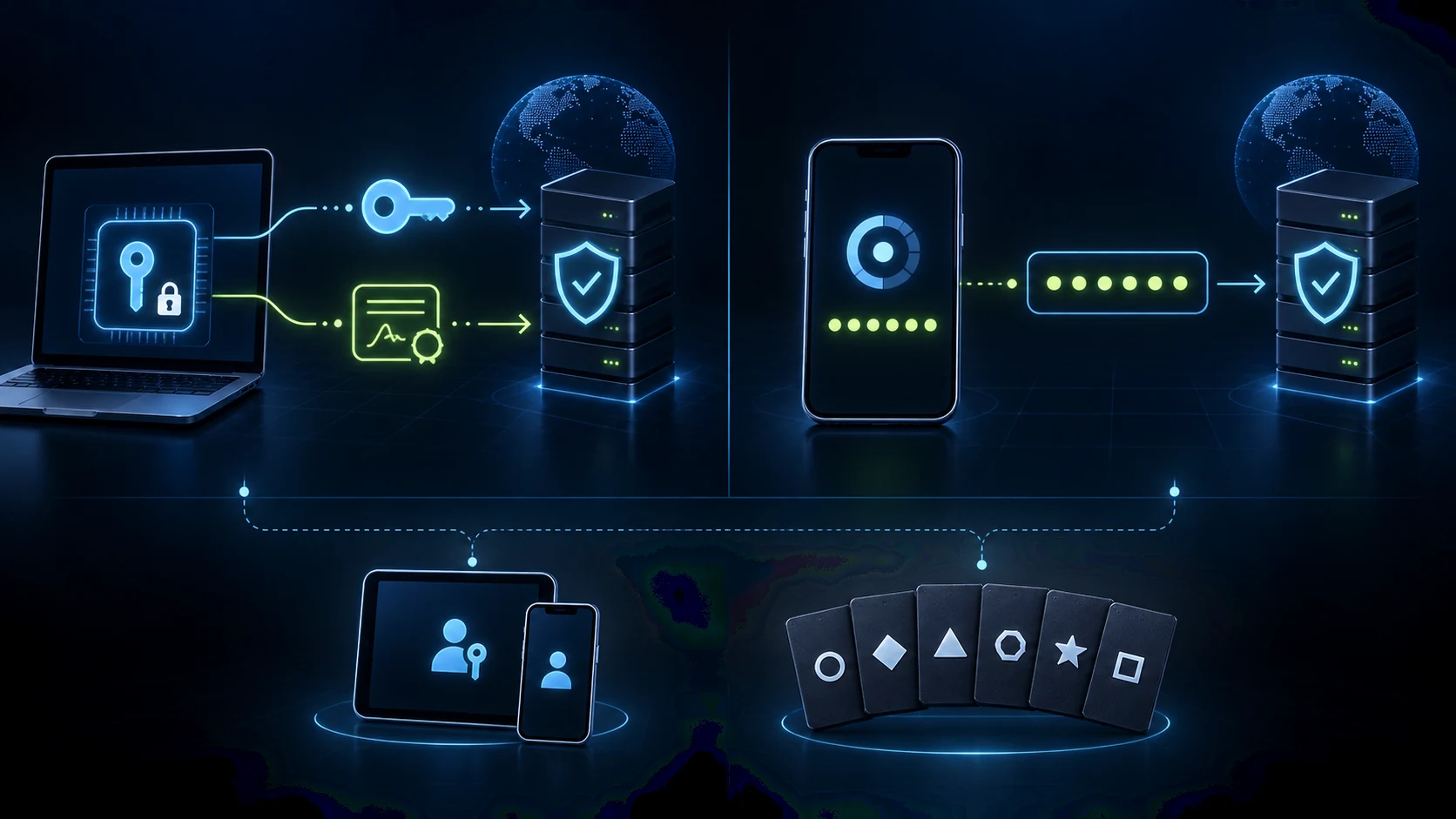
Your device creates a private key that remains protected on the device and a public key stored by the service. At sign-in, the service sends a challenge. Your device signs it after a fingerprint, face scan or screen-lock check, and the service verifies the signature.
A TOTP app creates a short-lived code from a shared secret established during setup. You enter the code after your password. It avoids mobile-network risks such as SIM swapping, but the code can still be entered into a convincing fake page.
The comparison that matters
The deciding factor: phishing resistance
An authenticator code is still information that a person can be tricked into handing over. An adversary-in-the-middle page can relay a password and fresh six-digit code to the real service immediately, then capture the authenticated session. The user completed the expected MFA step, but completed it through the wrong site.
A passkey removes that transferable code. Its challenge is cryptographically tied to the legitimate service's domain. A lookalike site cannot ask the device to produce a valid signature for the real site, regardless of how accurate the copy looks.
An authenticator code asks, “Do you possess the shared secret?” A passkey also proves, “Are you signing in to the correct site?”
Where authenticator apps still earn their place
- Services without passkeysMany older, smaller and enterprise applications still offer password-plus-TOTP as their strongest practical option.
- Mixed-device environmentsA standards-based authenticator app can feel more predictable when a user moves frequently among Windows, Android and iPhone.
- Shared devicesA readable code can be easier for a household account, although sharing a factor is a security trade-off rather than a security advantage.
- Borrowed computersPasskeys work through cross-device QR flows, but typing an authenticator code may still feel more familiar and immediate.
Those advantages describe coverage and convenience, not stronger resistance to phishing. TOTP remains useful because it is widely available and substantially better than a password alone.
Which one should protect which account?
The setup mistakes that undo strong authentication
For passkeys, the biggest mistake is leaving a single device as the only route back into an important account. Register a second trusted device or hardware key where the service allows it, and understand whether your passkey is synced or device-bound.
For authenticator apps, the common mistake is ignoring the recovery codes provided at setup. Store them somewhere secure and separate from the phone. Do not wait until a device is lost to discover that the account has no tested recovery path.
A strong sign-in method with a weak recovery process is still a weak account. Review the fallback methods on primary email, banking and workplace accounts before an emergency.
Practise choosing the stronger signal
These games make identity, phishing and evidence decisions visible before you need to make them on a real account.
 PRIMARY PRACTICE
 PHISHING INSTINCT
 EVIDENCE MAPPING
Questions people ask
Should I delete my authenticator app after switching to passkeys?+
No. Keep it for services that do not support passkeys and as a backup method where an account permits multiple authentication options.
Can a passkey be phished?+
Not in the way a password or TOTP code can. The cryptographic exchange is bound to the legitimate site, so a fake page cannot complete it. Recovery flows and device security still matter.
What happens if I lose the phone containing my passkeys?+
Synced passkeys can normally be recovered through the associated cloud account on another device. Device-bound passkeys or hardware keys require a separately registered backup method or key.
Are authenticator apps still worth using in 2026?+
Yes. Support for passkeys is growing but is not universal. Authenticator apps work offline and remain compatible with a very wide range of services.
Is SMS two-factor authentication still worth using?+
It is better than password-only access but weaker than the alternatives because it is phishable and exposed to SIM-swap fraud. Use it only when nothing stronger is available.